
Mobicité,
the best way to pay for parking in Montreal.


Can't download the app? Use the web version of Mobicité.

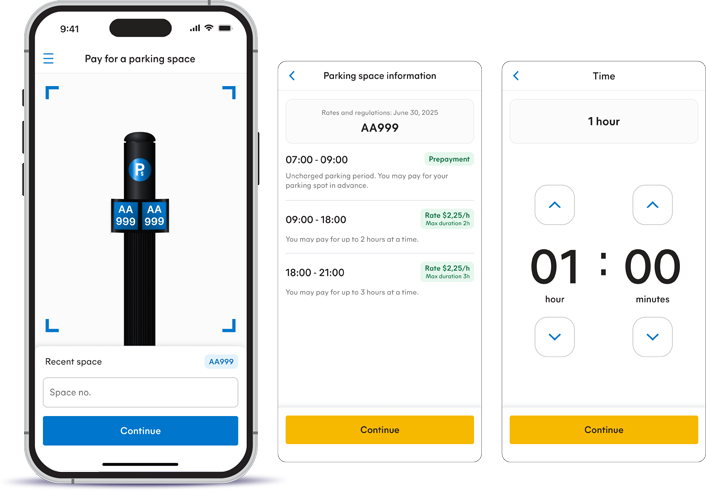
View the parking regulations before paying,
wherever you may be.

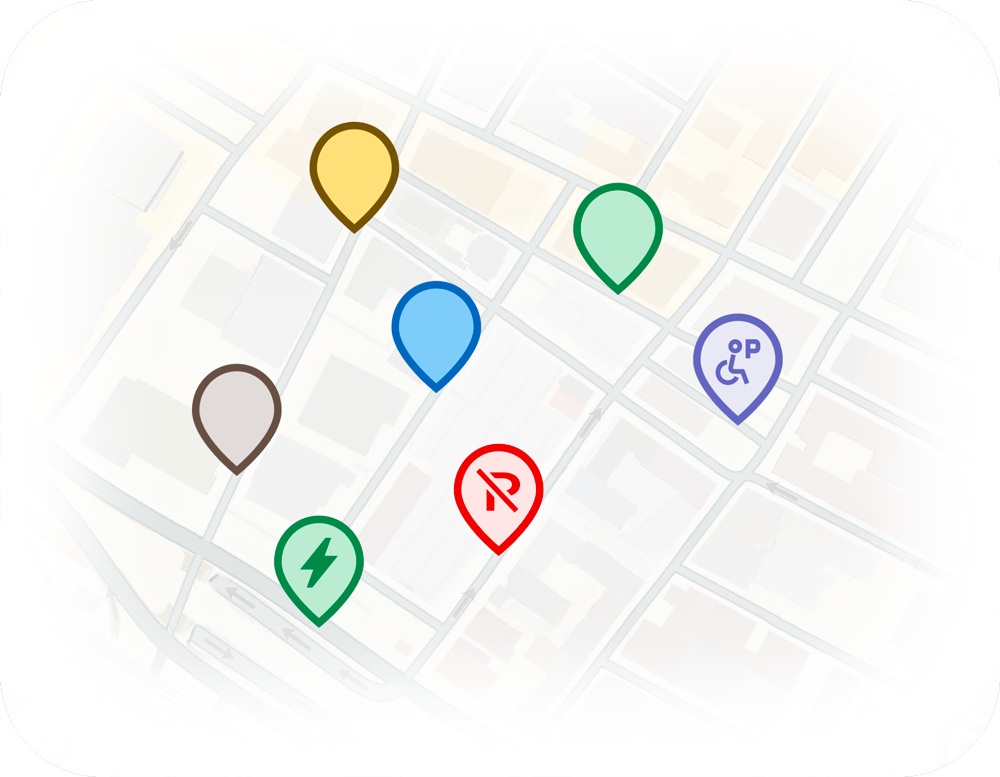
View a map showing the Agence de mobilité durable de Montréal’s entire paid parking offer.
Add more than one credit card to your account and choose one of them to pay for your parking.
It's simple, easy and secure!
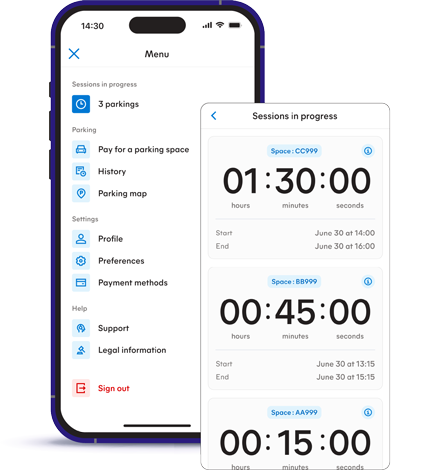
Pay for more than one parking session at a time with the same account and see the time remaining for each session at a glance.
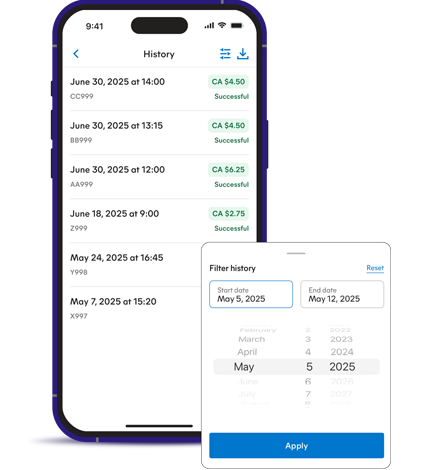
Manage your account and view or download your transaction history at any time.
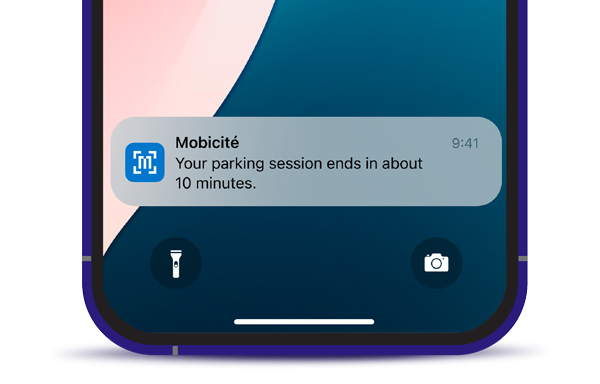
Receive a notification 10 minutes before the end of your parking session.
FAQ
Account
How can I change the email address linked to my account?
To change your email address, log in to your account and select “Profile” from the main menu, then update your email address.
My account has been suspended. What should I do?
Contact customer service at (514) 868-3737 or by email at
I’ve noticed unusual transactions or activity in my Mobicité account. What should I do?
Change your password and contact customer service right away at (514) 868-3737. Our agents will advise you on what to do if there has been fraudulent activity on your account.
How can I delete my account?
Note that once your account is deleted, you will no longer be able to log in. This action cannot be undone. Be sure to keep copies of your transaction receipts before deleting your account.
To delete your account, select “Profile” from the menu and then “Delete My Account”. You will then receive a confirmation email. If you want to use the app again in the future, you will have to create a new account.
Please note that, although we will no longer be able to access the data associated with your account, some data may be kept by the Agency. See our Privacy Policy for more information.
Payment & transactions
Which parking spaces can be paid for with Mobicité?
Mobicité allows you to pay for your parking space in Pay and Go mode in the territory of the city of Montréal, whether on the street or in a parking lot.
Note that spaces in parking lots managed by the Agency and identified by a space number can be paid for with the app if permitted by regulation.
For the list of parking lots with Pay and Go spaces: https://www.agencemobilitedurable.ca/en/parking/parking-lots
Which payment methods are accepted?
Visa, Mastercard and American Express credit cards can be used to pay for a parking space with Mobicité.
How do I add/remove a credit card?
- Select “Payment Methods” from the menu.
- Select “Add Card” and enter the data.
- If you want to save the card for future use, click “Save”.
- Select “Payment Methods” from the menu.
- Choose the card you want to delete.
- Click on “Delete Card”.
Please note that, although we will no longer be able to access the data associated with your account, some data may be kept by the Agency. See our Privacy Policy for more information.
How can I extend my parking session?
It is not possible to extend your parking session, as each transaction is final and processed independently from previous ones. If you wish to extend your parking time, you must wait until your current session has ended before paying for a new one.
Will I receive a payment confirmation for my parking space?
A transaction receipt will be sent to your email address as soon as the payment is confirmed. You can also view your transaction history in the “History” tab. If a transaction doesn’t appear on the list, please contact customer service at (514) 868-3737.
I paid for the wrong parking space! What should I do?
According to our terms of use, transactions made on Mobicité are final. Our customer service cannot correct a transaction.
My transaction failed. What should I do?
Please try again. If the problem persists, contact customer service at (514) 868-3737. To avoid receiving a ticket, we suggest you pay for your parking space at a terminal, with cash, a credit card or an Interac Flash debit card.
Is there a limit on the number of transactions for the same parking space?
As long as the regulations allow it, there are no restrictions on the number of transactions allowed for a parking space, whether via the Mobicité app or at a pay station.
Are there a transaction fee when I use Mobicité to pay for parking?
A 7¢ service fee is added to each transaction made on the Mobicité app. These fees cover the costs of developing, managing, and maintaining the Mobicité app.
How can I see my transaction history and past receipts?
To view your transaction history, click “History” in the main menu.
To email yourself a receipt, select the transaction of your choice in your transaction history and click “Send by Email”.
To download a statement of your transactions, click “History” in the menu, then click the download icon located at the top right of the screen. Next, select the desired period and click “Download”.
Is it safe to use my credit card on Mobicité?
Yes, because Mobicité is a secure application. The Agence de mobilité durable de Montréal applies industry standards to prevent unauthorized disclosure, illegal use, loss, destruction or deterioration of your personal information. For more information, please see the “Security” section of our Privacy Policy.
Alerts & notifications
How can I manage alerts?
Click on “Preferences” in the menu to enable or disable alerts.
Please note that parking session end reminders are not available in the web version of the app.
When will I receive the end-of-parking notification?
Depending on the preferences set in your account, a notification will be sent to you 10 minutes before your parking session ends.
Please note that parking session end reminders are not available in the web version of the app.
I haven't received an end-of-parking-session alert. What should I do?
If you haven’t received an end-of-parking-session alert, we suggest you check your account to be sure alerts are activated. If this is the case, contact customer service at (514) 868-3737 or
Please note that parking session end reminders are not available in the web version of the app.
Miscellaneous
Which operating systems are recommended?
We recommend using the most up-to-date version of iOS or Android.
The web version of Mobicité (mobicite.ca) is accessible via Google Chrome, Safari, and Microsoft Edge. For an optimal experience, use the latest version of your browser by updating it.
Why doesn’t my device’s operating system version allow me to download or update the app?
To meet industry standards and for security reasons, Mobicité runs on iOS versions 16 and above or Android versions 13 and above. To download the app, you must update your operating system.
It is also possible to download Mobicité on Android versions 10, 11, and 12. However, these devices are no longer supported by Google, which no longer provides security updates for them. They are therefore more vulnerable to security breaches, and new features added to the app may not be compatible.
I paid for my parking space through Mobicité but I received a ticket. What should I do?
If you receive a ticket that you think is unjustified, fill out the not-guilty plea on the back of the statement of offence and attach a printed copy of your receipt as proof of payment. Then mail it to the Municipal Court. The address of the post-office box is on the back of the statement of offence.
How can I pay for a parking space if I don't have the Mobicité app?
You can use the web version of the app at mobicity.ca.
You can also use one of our street pay stations to pay for your parking space.
When does my parking session countdown begin?
The countdown starts when the payment is confirmed. The user is responsible for managing parking periods paid for with Mobicité. The remaining time shown by the timer is approximate. This information is provided for information purposes only.
Is my personal information protected when I use Mobicité?
Yes. We take the protection of Mobicité users’ personal information very seriously and only collect the data that is essential for the app to function. We apply industry‑standard security measures to prevent unauthorized disclosure, unlawful use, loss, destruction, or alteration of your personal information.
For more information, please see our Privacy Policy.
Will I be notified if the terms of use change?
Yes. According to Mobicité’s terms of use, the Agence de mobilité durable de Montréal must inform you of any changes to the terms of use.
After opening your account, you must read the updated terms of use and accept them to continue using the service. You will not be able to access your account unless you agree to the terms of use.